Reimagining Incident Management by leveraging AI
AI & LLM are revolutionizing enterprise incident management processes. We had to respond quickly and strategically to this shift.
04
My Role
Lead designer, Strategy alignment, End-to-end UX & interaction design
05
Team
8+ teams: UX Design, Product, Business, Research, Design Systems, Data Science, ServiceOps, AIOps, ITSM case management and Engineering
06
Lesson
AI is a game-changer for high-pressure tasks. Simple and digestible insights are more valuable than complex features in critical situations.
Results & impact
40% Faster
MTTR across ITSM & AIOps
70% Adoption
~6 months post launch
3x Less
Service downtime
Things I designed in this project...
Identifying the right problem to solve
Background
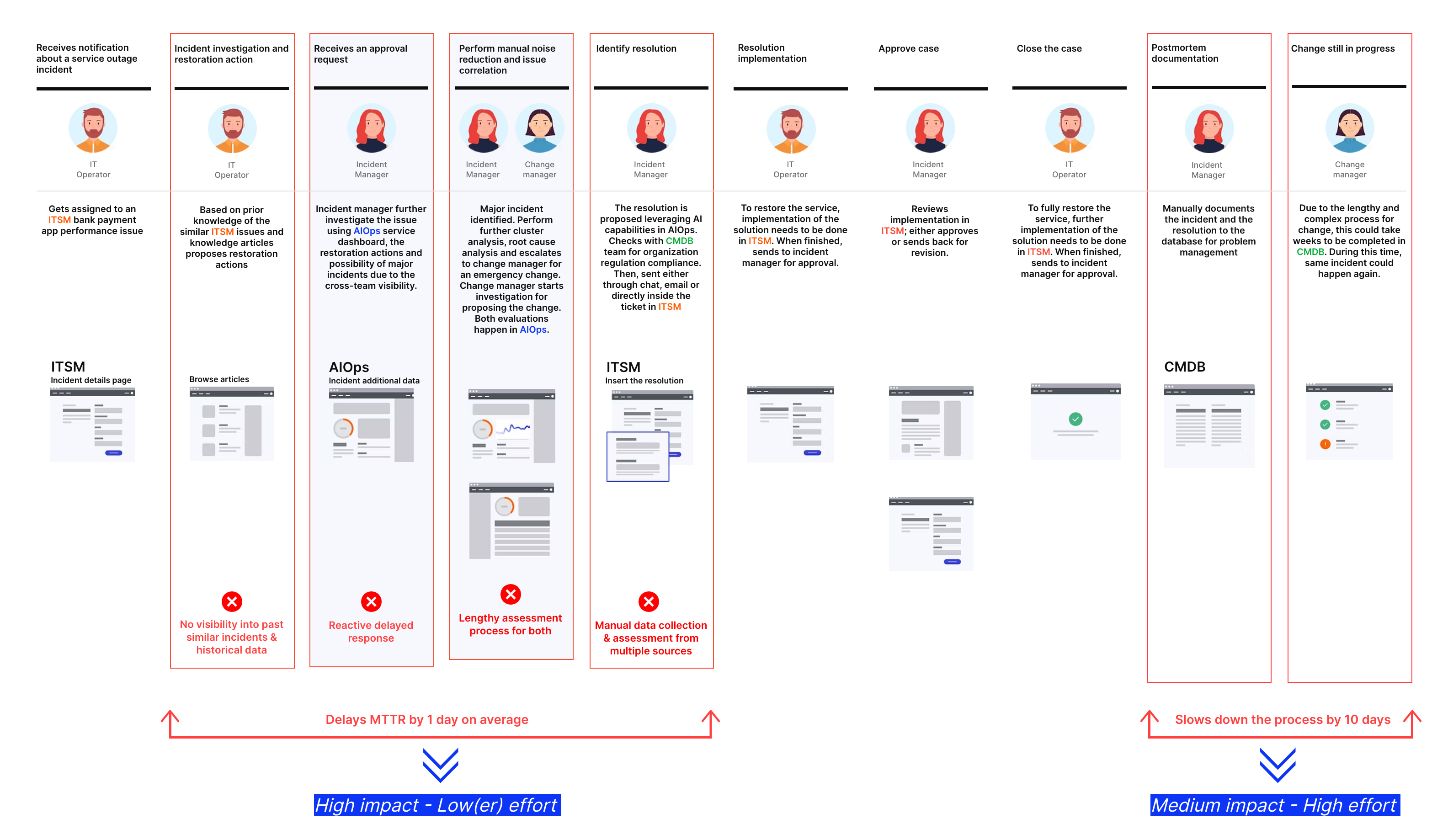
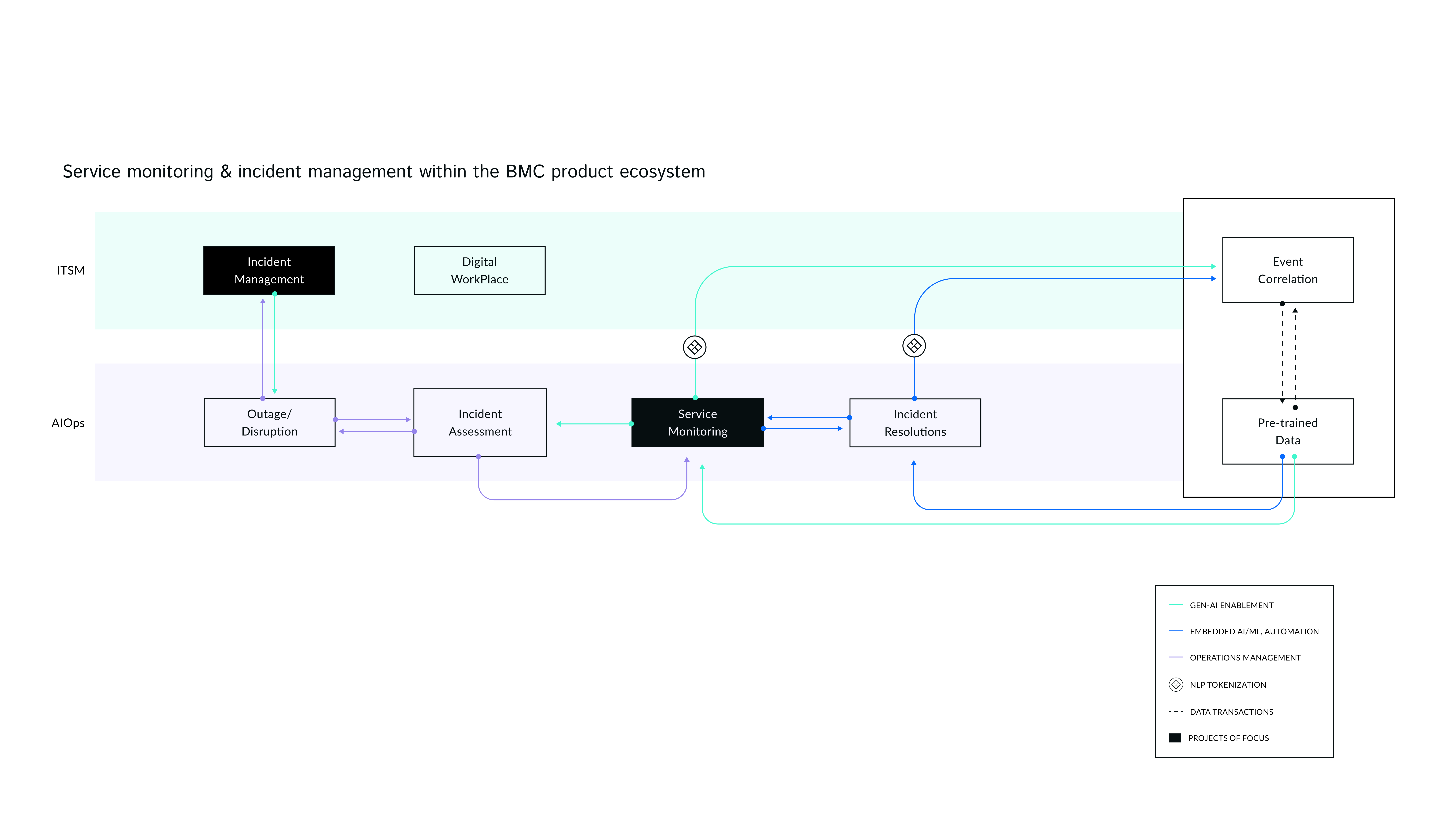
BMC ITSM & Operations Management have long been a showcase for machine learning & automation for IT service management. But the rise of Large Language Models posed an unprecedented challenge: suddenly, Service Management losing dependency of building and optimizing machine learning models. LLMs could handle tickets out of the box (with light database training), and enterprises are looking to restructure their IT operations & SREs teams.
We had to respond quickly and strategically.
High-level Process
-
Discovery & Strategy alignment
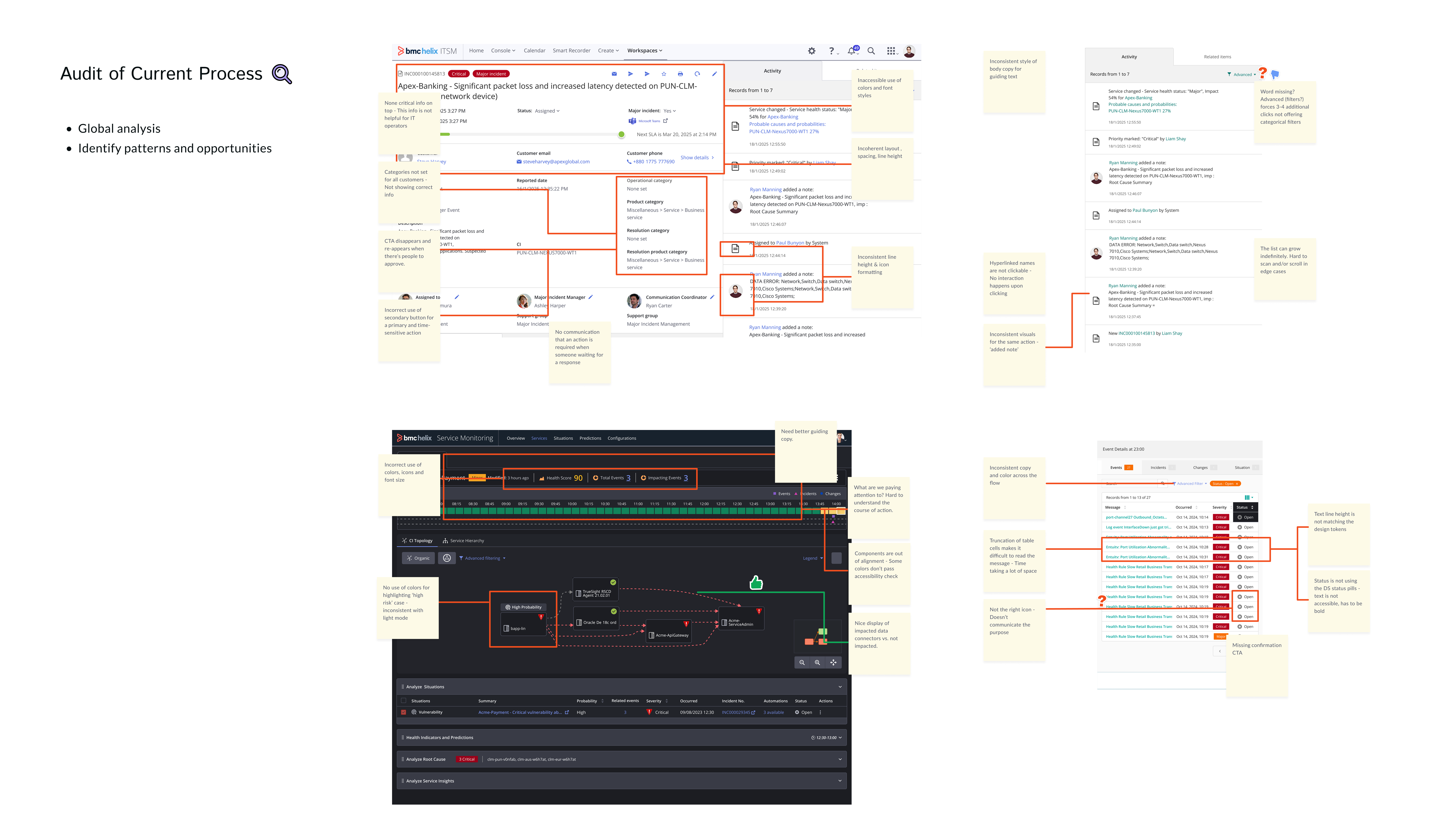
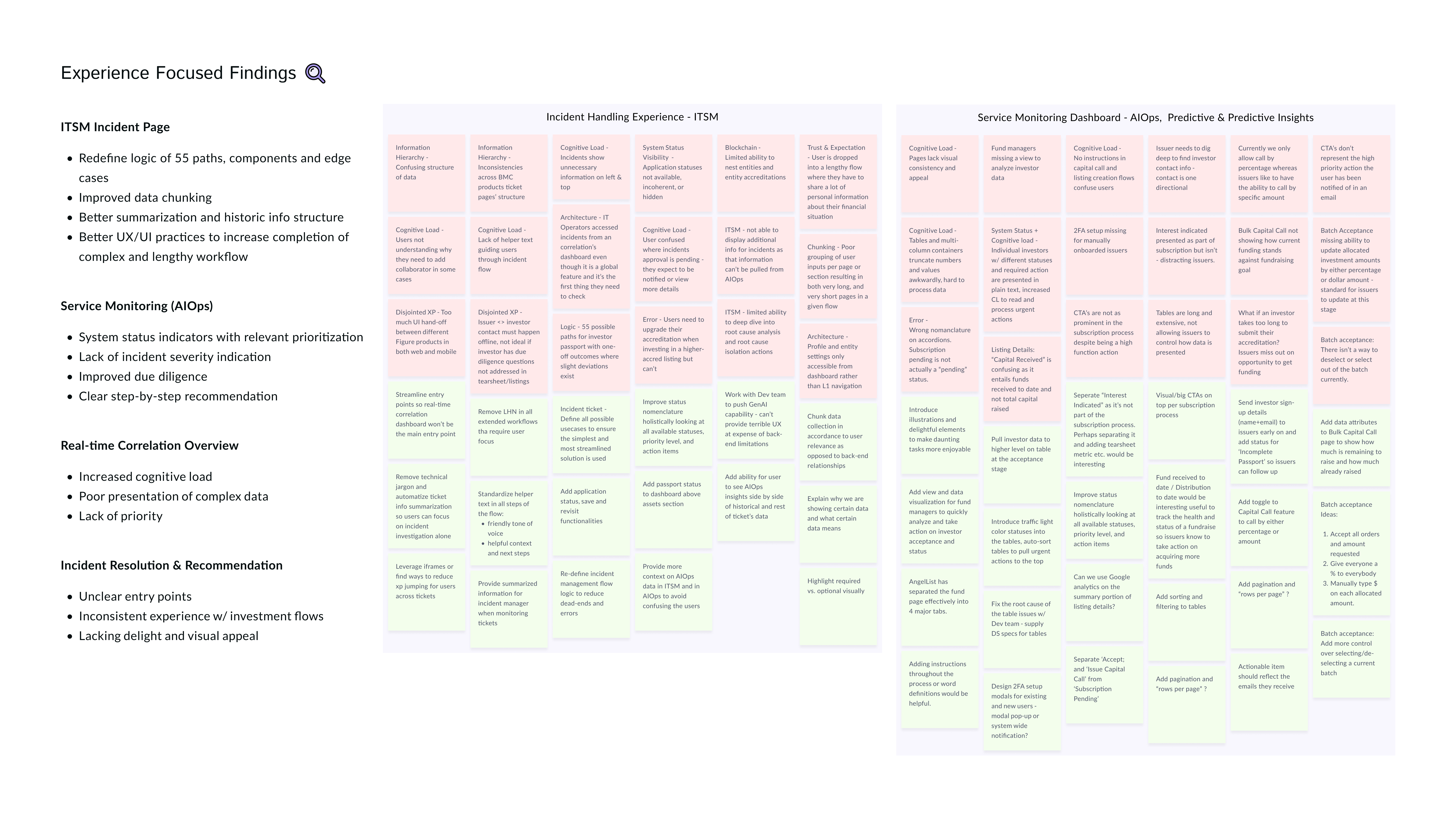
I started by understanding the problem by reviewing historic incident research findings revealing major usability issues, poor visual hierarchy, countless back-and-forth amongst roles for retrieving sufficient data. The design didn't have the flexibility for improvements to accommodate customer needs and achieve business ROIs.
-
Audit of current experience & Competitive analysis
Next, I explored how other platforms like ServiceNow, Splunk, Atlassian, and Zendesk handle incidents. While their page structure is better optimized to surface important information, have access to chatbots, and related incidents, they struggle with deep AI insights. None support deep AI insights on incident ticket level, and the lack of access to AIOps info makes the experience identical across all.
-
Design exploration & AI strategy alignment
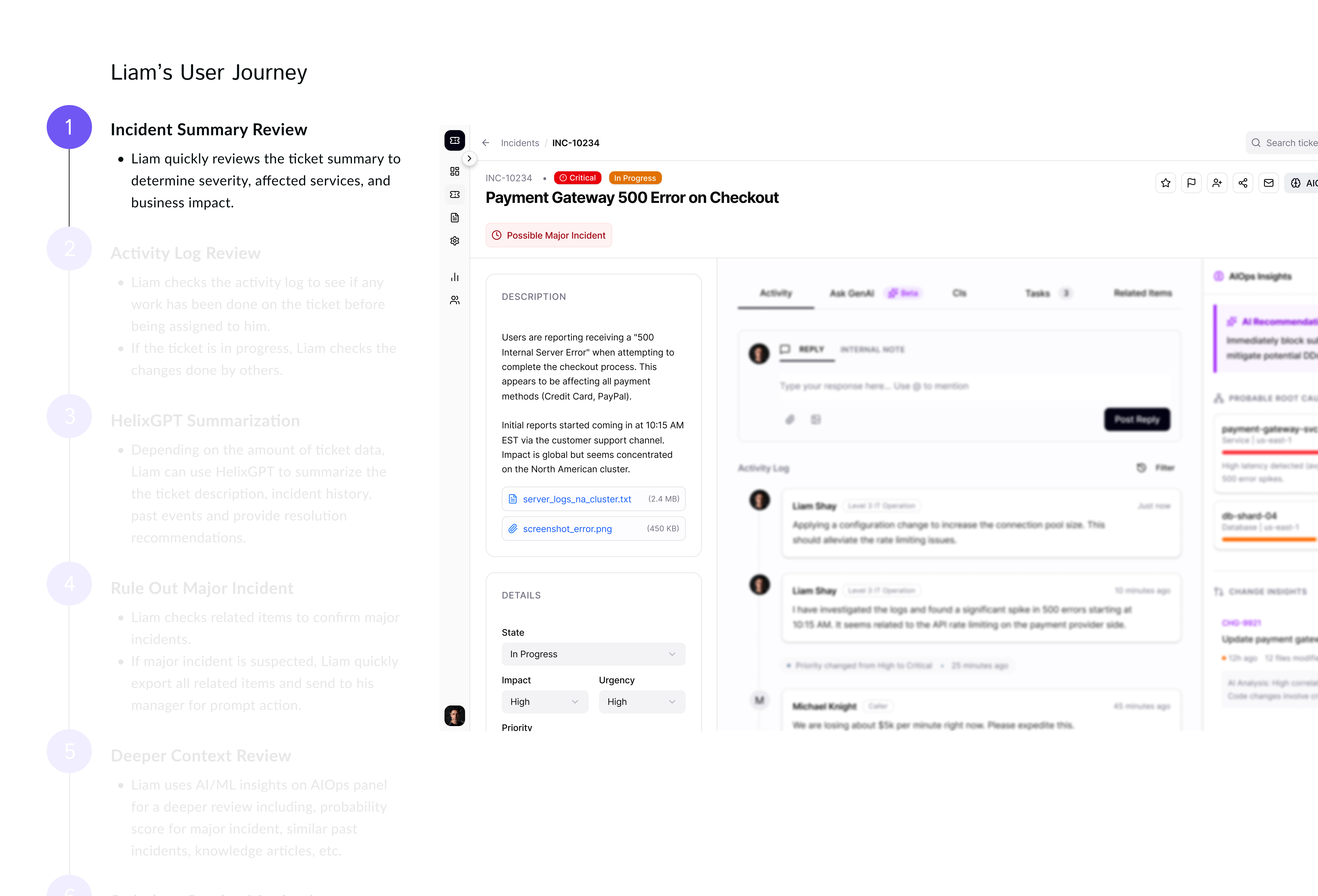
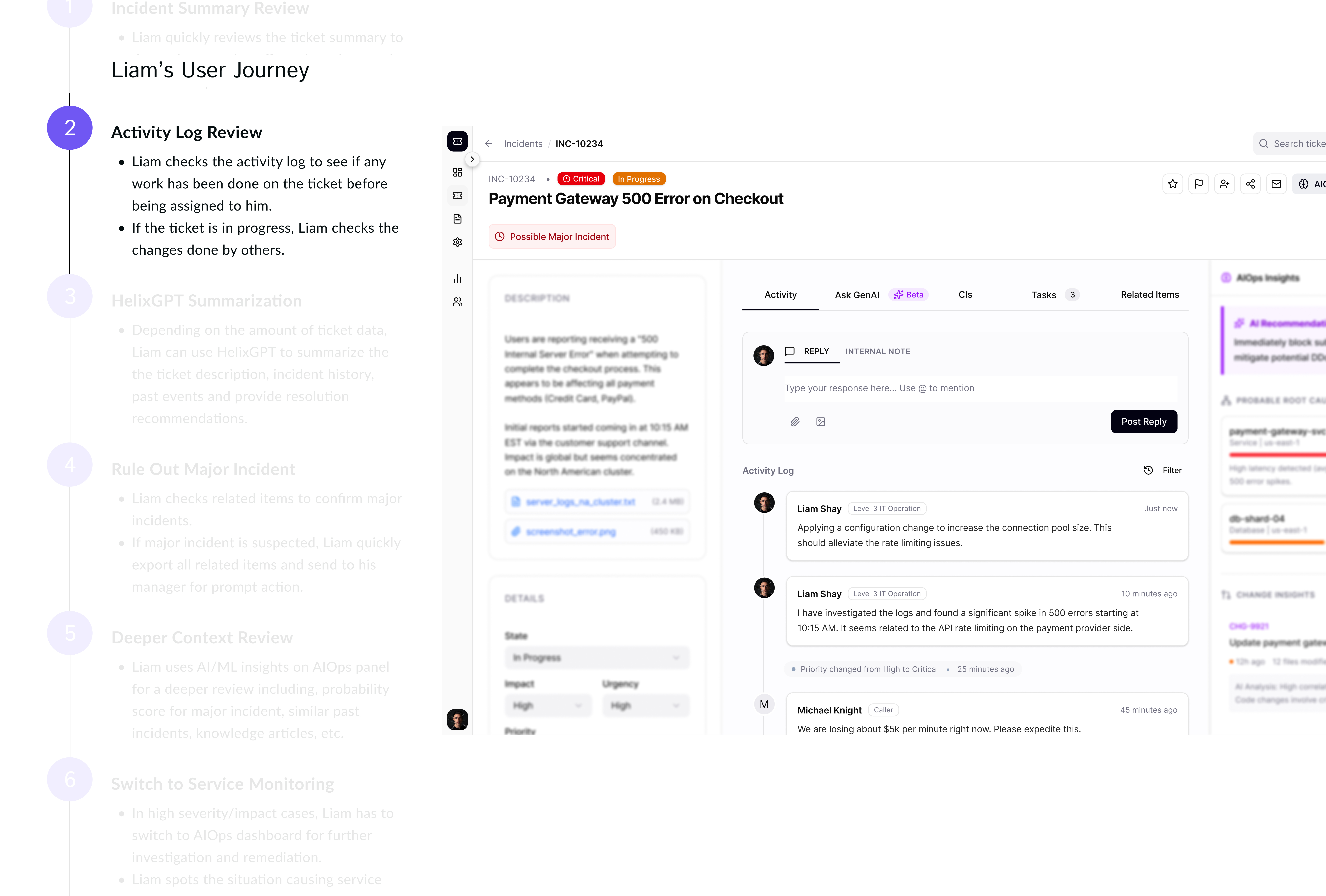
For each phase, I started with quick sketches to figure out how to mitigate the delays for operators and where AI should come into the play. I realized they usually follow a specific flow to retrieve information, starting with reviewing activities THEN looking for insights. This helped me quickly understand the structure and flow.
-
Design iterations & Testing
I went through several rounds of design iterations in each phase and narrowed it down to two options for user testing using a Payment Gateway Failing scenario which is costing the business +200k/minute.
-
Post-launch monitoring & Design optimization
As the lead designer, I was responsible for measuring the design impacts. I reviewed Qualtrics data on a monthly basis and attended PM's monthly customer calls to hear feedbacks on the new designs and ask followup questions to further enhance the designs.
.png)
Liam
IT Operator - Incident Management Team
Goals
-
Help the business minimize service downtime by faster incident resolution
-
Proactive & holistic analysis of incidents to prevent Major Incidents
Pain Points
-
Not well versed in mitigating incidents and difficulty locating relevant data within company’s complex data model
-
No access to deeper level incident insights from AIOps (Service Monitoring) dashboard
-
Lack of experience interpreting complex incident insights
How might we leverage conversational, predictive & proactive AI enabling Liam (IT Operator) to make confident and quick decisions?

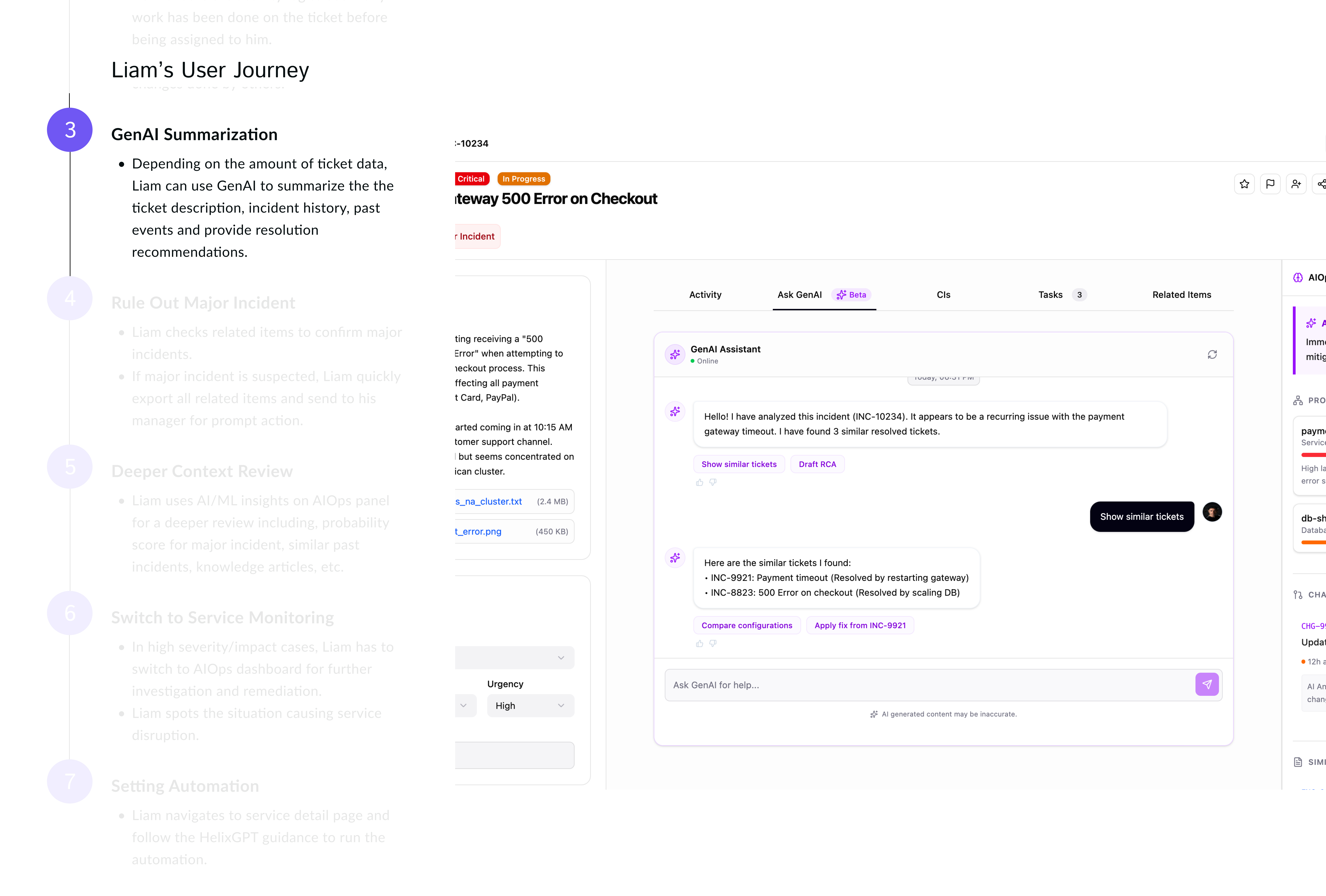
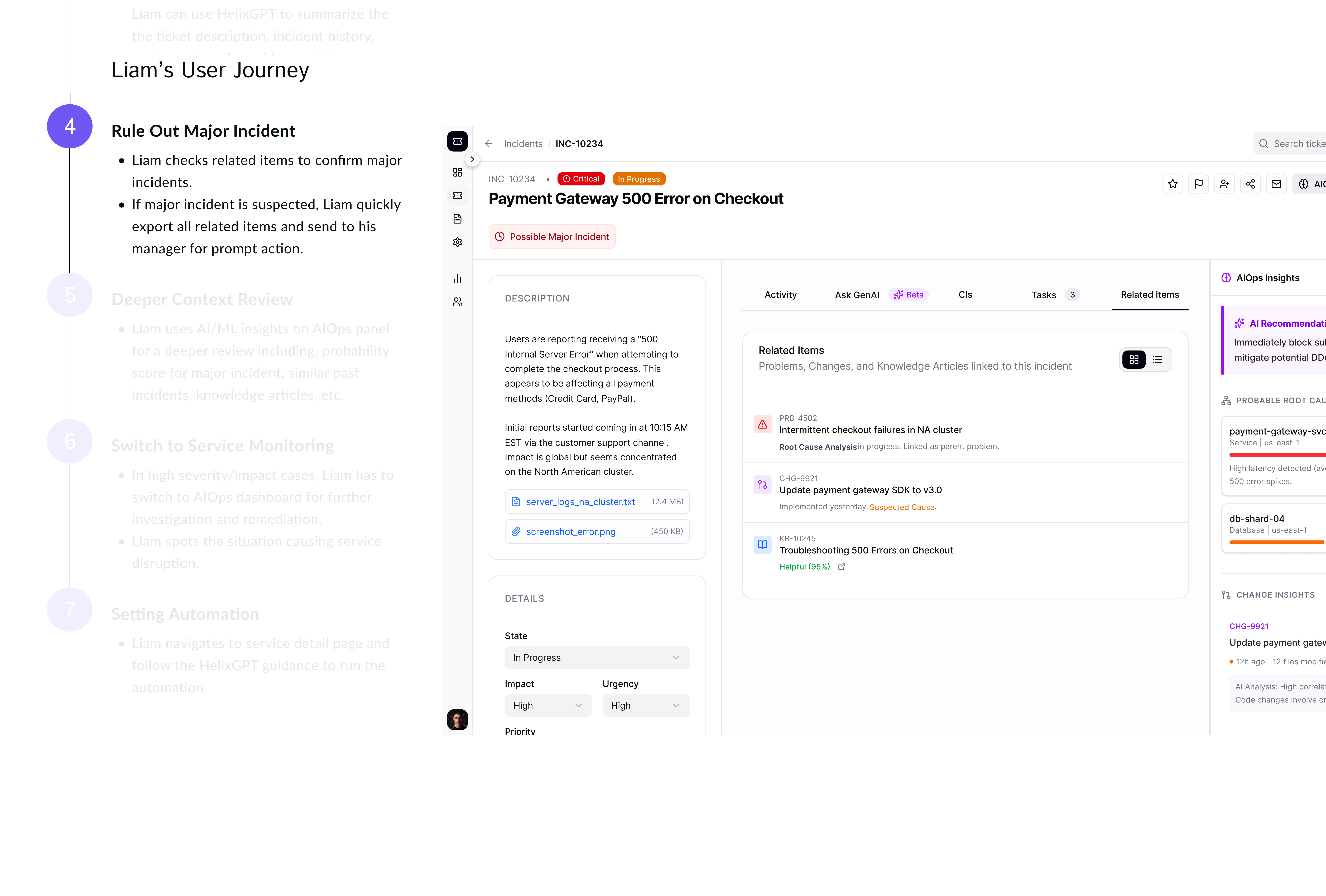
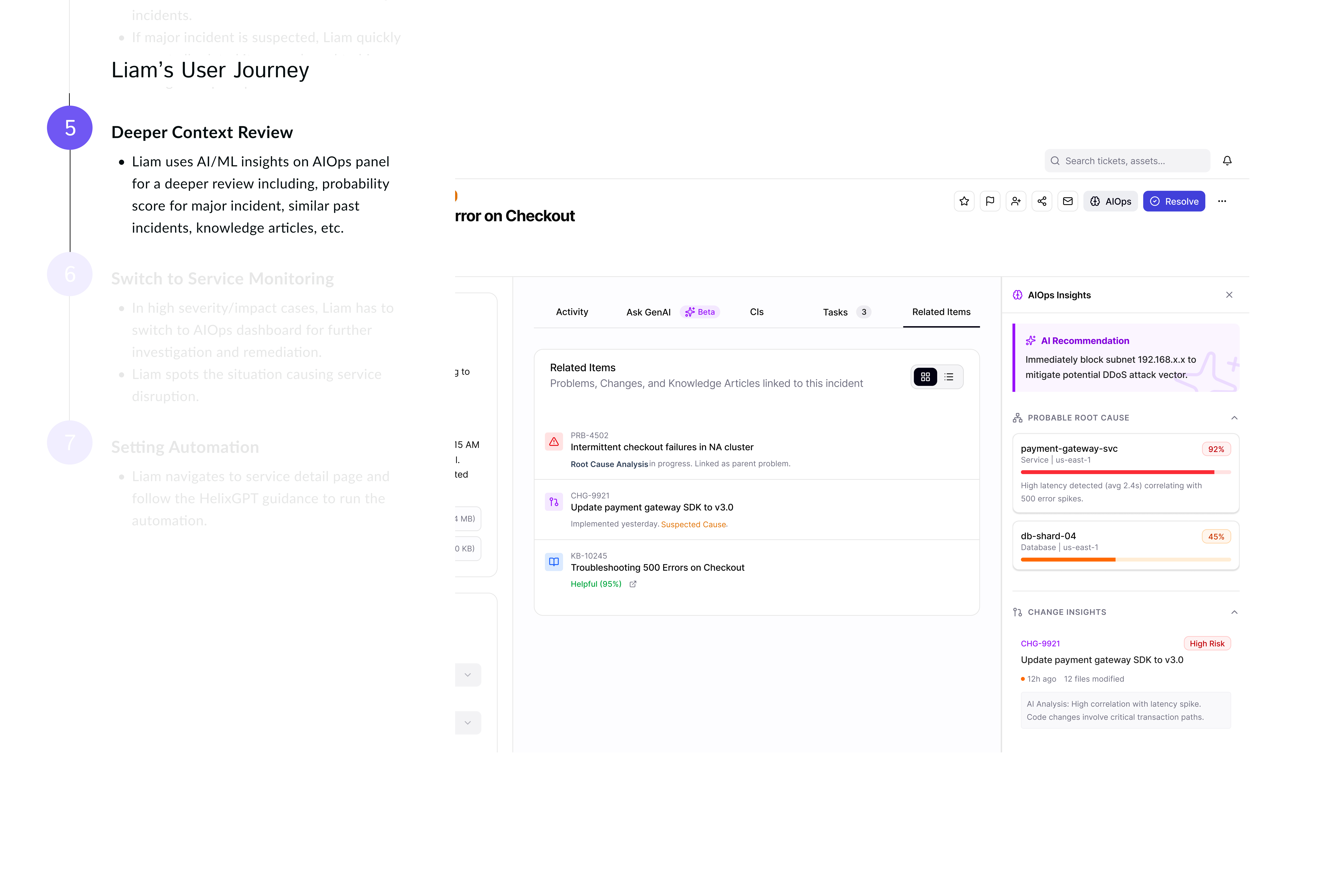
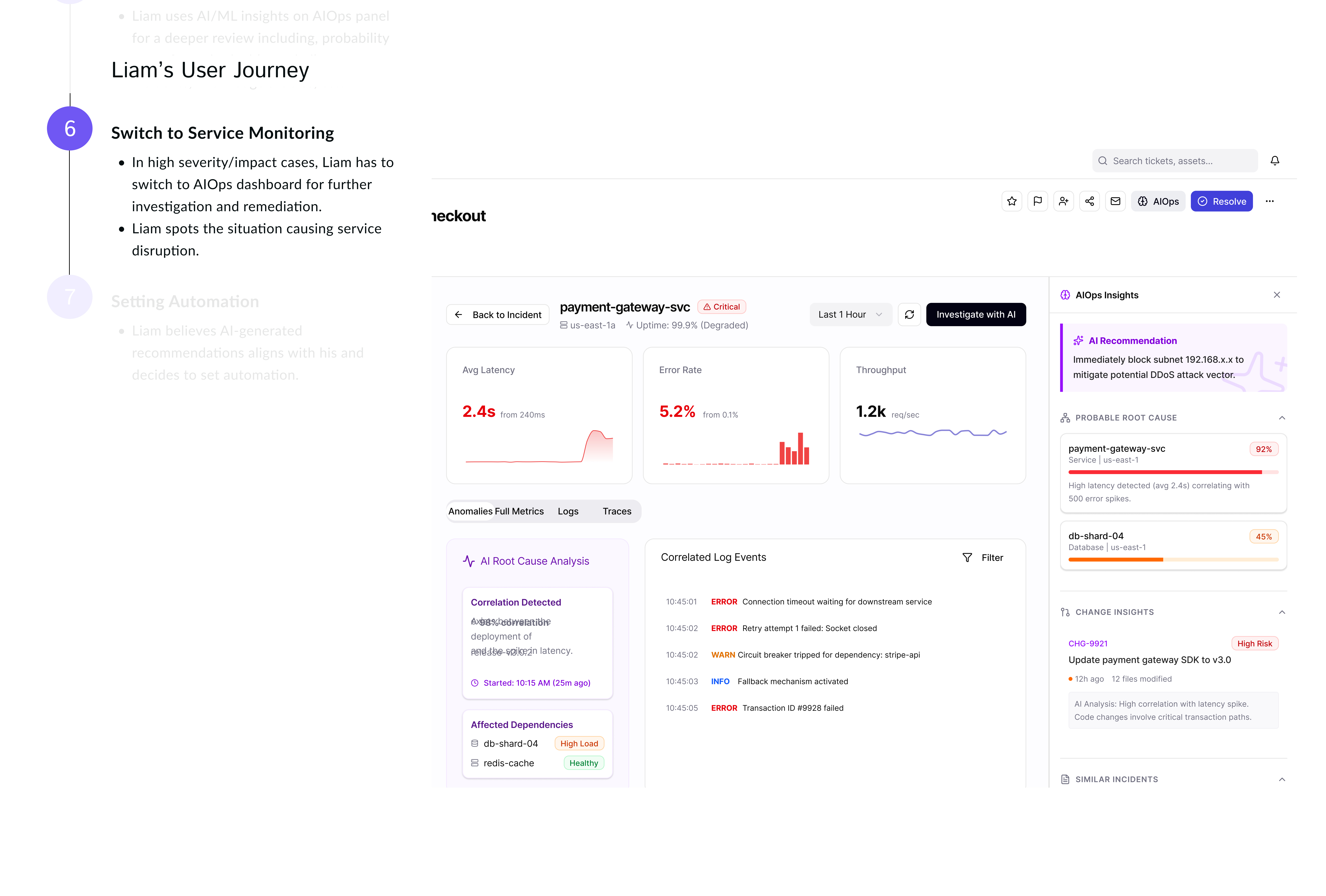
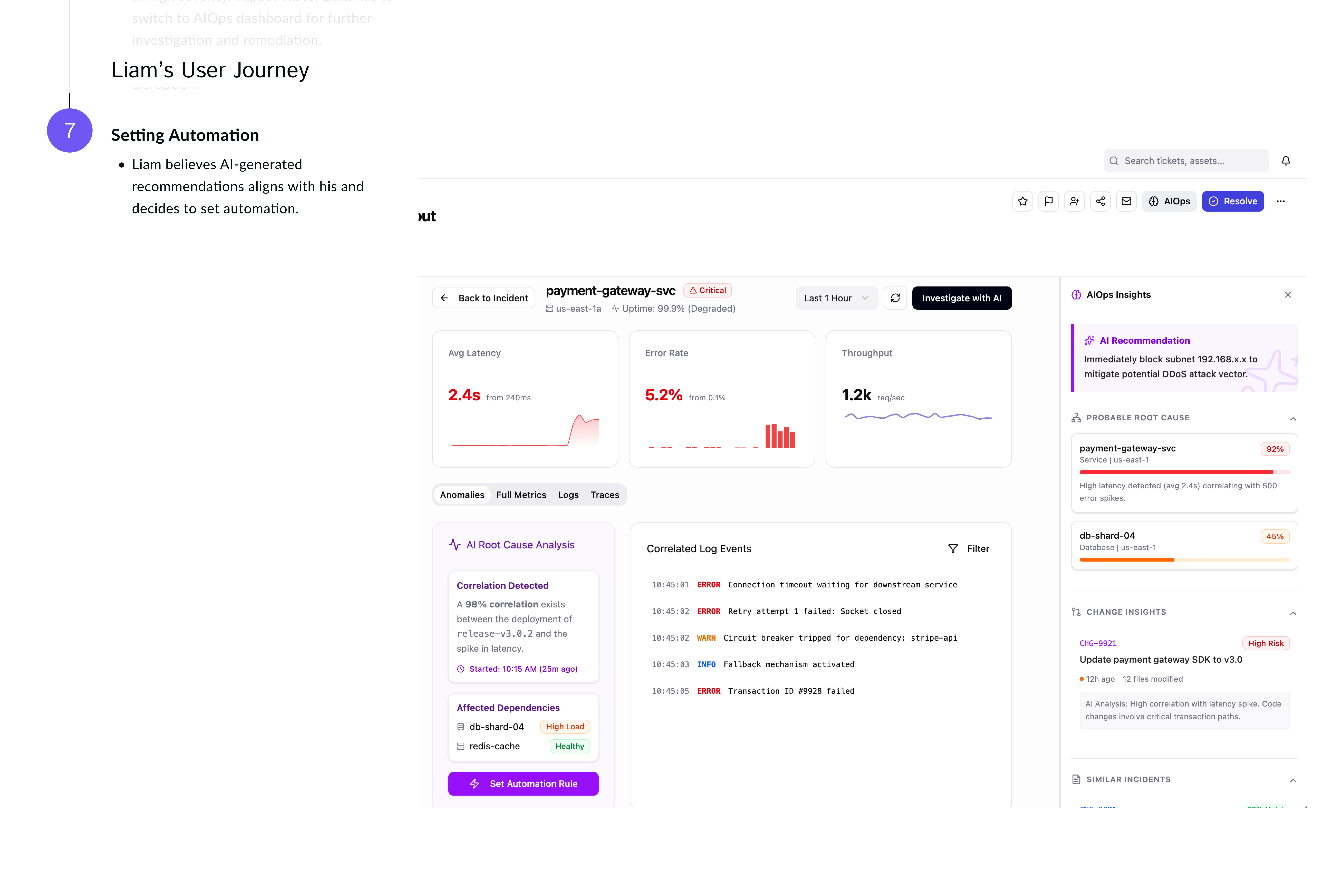
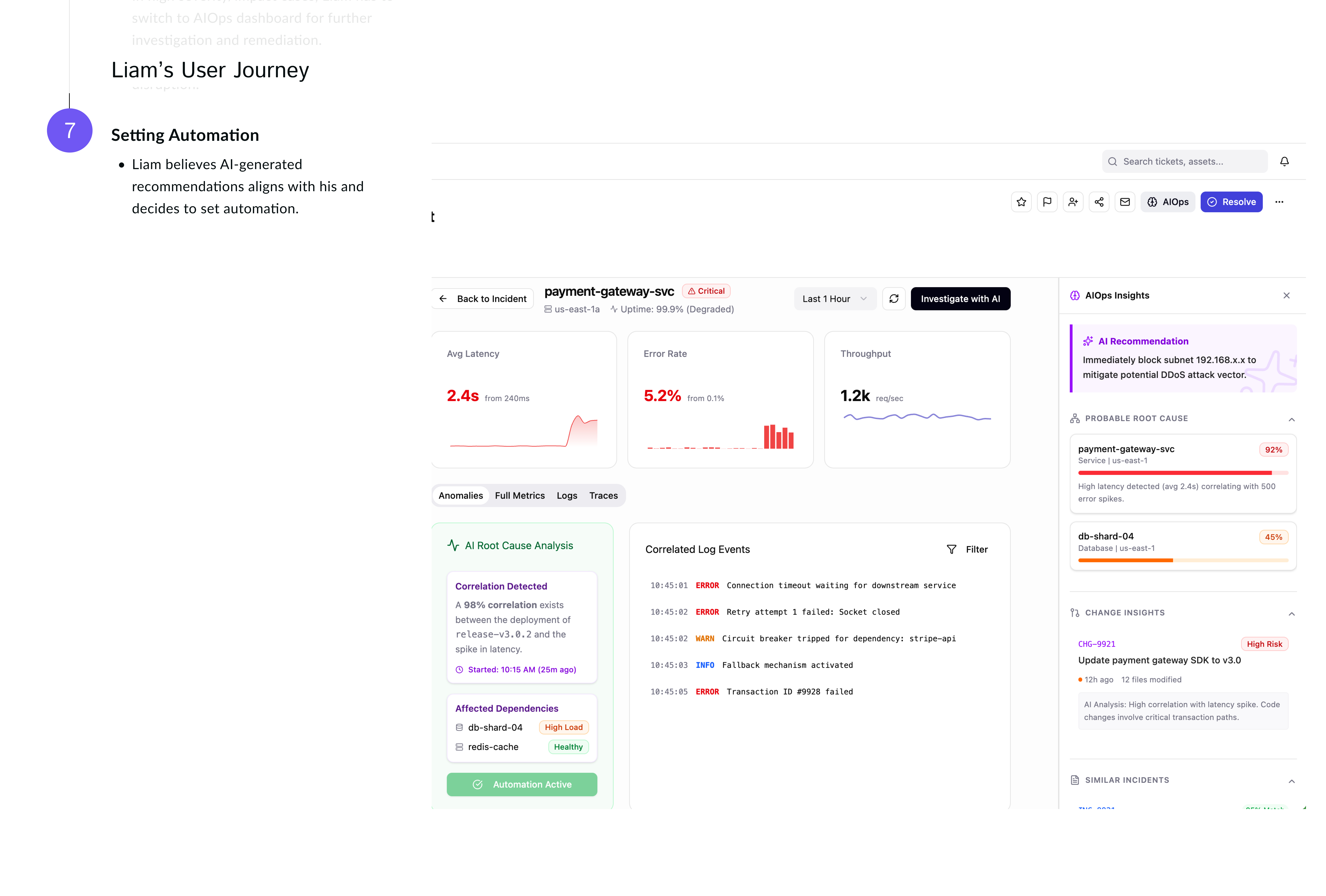
Narrative-driven user journey - The enhanced flow for Liam
Phase 1: Integrating HelixGPT (core MVP)
Process
I partnered with the product team to identify a high value low effort way for GenAI integration that align us with product roadmap and delivery schedules.
Navigating resource constraints is a key UX skill. With limited time and budget restricting direct user outreach, I strategically leveraged existing patterns across BMC products for the MVP release. I facilitated design workshops to co-create solutions that balanced user needs, business goals, and technical feasibility and planned for beta testing and usability testing to ensure design meets user expectations.


Phase 2: Re-architecting incident page → A modular model
Process
After launching the MVP, we granted early access to some customers. This allowed us to closely observe real user behavior and gather data to guide improvements and we noticed major usability issues including:
Low Findability / Poor Information Architecture
Users cannot quickly locate key actions or data. Search patterns, heatmaps, and user interviews reveal that the most-used elements are buried or visually de-emphasized.
Scaling Constraints for AIOps integration
The existing layout cannot accommodate new data types, features, or automation insights, leading to cluttered add-ons and patchwork fixes over time.
These key insights shaped the direction of our next milestone:
Restructuring of the incident page to accommodate AI insights from AIOps .
01
Need: Incident summary
Users needed a way to summarize all the related information to ticket, ask questions, or connect with others who resolved similar issues recently. There was also no clear feedback loop between solvers and constructors.
Action
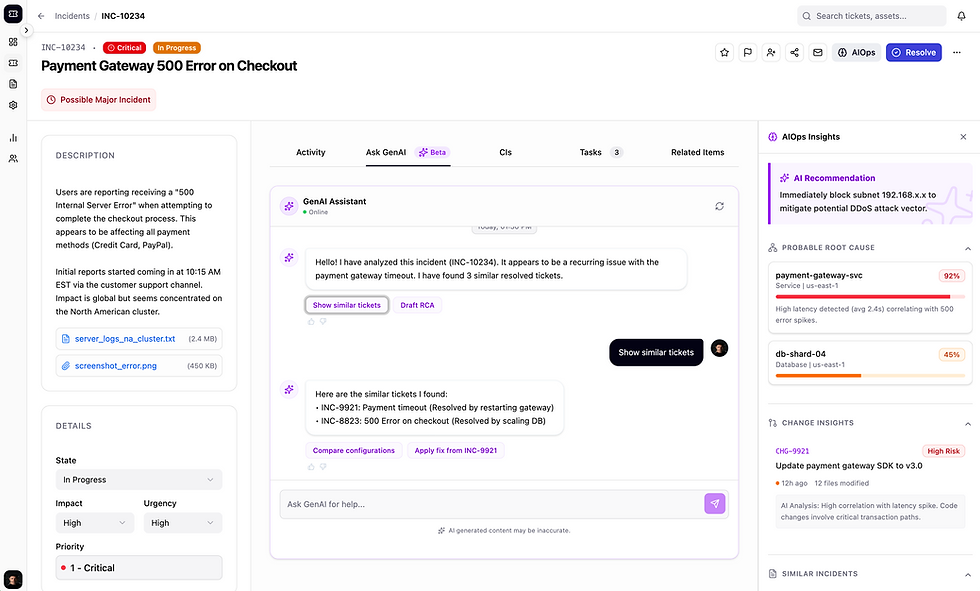
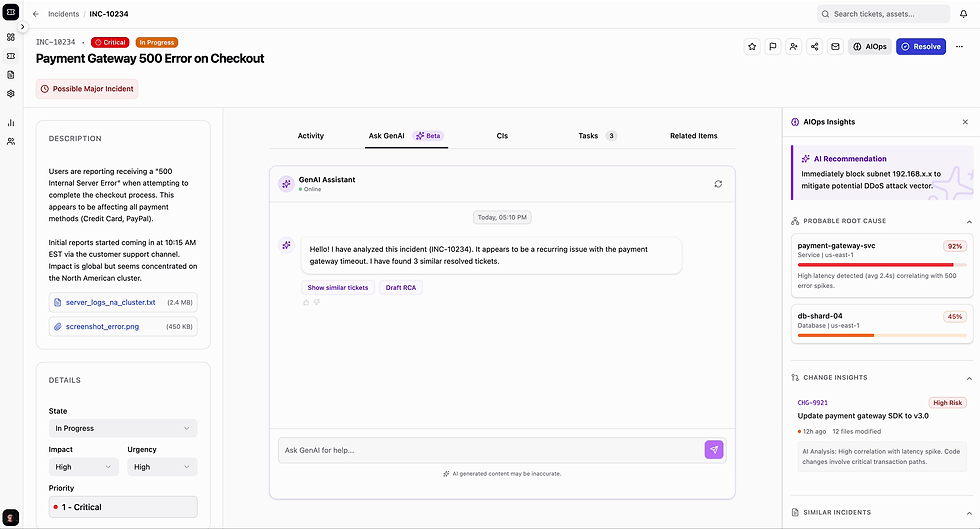
Introduced HelixGPT conversational experience that enables IT Operators to get quick insights into the incident ticket including knowledge summary, resolution insights and recommended actions.
Impact
We saw a noticeable decrease in the time and effort needed to resolve incidents by automatically interpreting ticket context, suggesting next best actions, and retrieving relevant system or knowledge-base information in real time

After - Conversational HelixGPT integration

Before

Phase 3: Introducing AIOps panel
User need: Need for deeper AI insights related to incidents to speed up incident resolution with higher success rate.
Business need: Expand revenue strategy for AIOps.
Process
The goal is to surface the right insight at the right moment in the incident workflow:
1. Identified where users lose time (e.g., gathering logs, correlating alerts, chasing root cause).
2. Determined when AIOps insights are most useful:
-
Early signal correlation during triage
-
Root cause suggestion during diagnosis
3. Define what each role needs to see and how much detail they require (summary → drill-down → raw data)
4. Decide where insights live; Ensuring insights appear at the moment of decision-making, not buried in tabs.
5. Show why an insight is surfaced (e.g., “Based on 12 correlated alerts across Service X”)
6. Highlight and prioritize predictive insights over informational.
7. Show severity with colors, confidence levels, and grouping to avoid overwhelming users.
I teamed up with data science and product to design AIOps panel
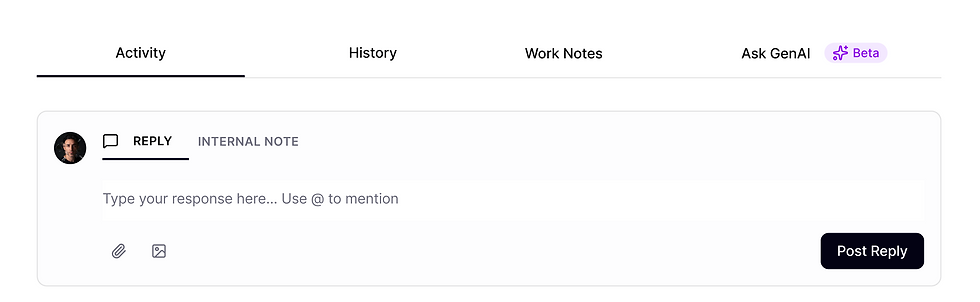
Tabs Enhancements
Need: Align tabs with users task flow and needs
Current tabs misaligns with how users naturally scan, prioritize and act on information
Action
The new design introduced more granular tabs organized around core incident tasks and prioritized HelixGPT
Impact
The new tab structure reduced cognitive load, surfaces the right context at the right moment, and allowed on-call engineers to move faster and with greater confidence during incident resolution.
Before


After - Revised tab items & order
02-2
Need: Card/List view in "Related items"
Users have different needs of scanning and interacting with linked data under “Related Items” section. Some teams need all the details where others need a more concise version for faster review.
Action
Introduced two interaction modes with a refined information hierarchy within each. The list view surfaces richer context, and helpful for deeper investigation. The card view supports quick triage and pattern recognition for on-call engineers who need to assess impact fast.
Impact
The design reduced cognitive load and made it easier to identify meaningful relationships across incidents, changes, assets, and alerts leading to improving incident understanding and resolution speed.
Card View

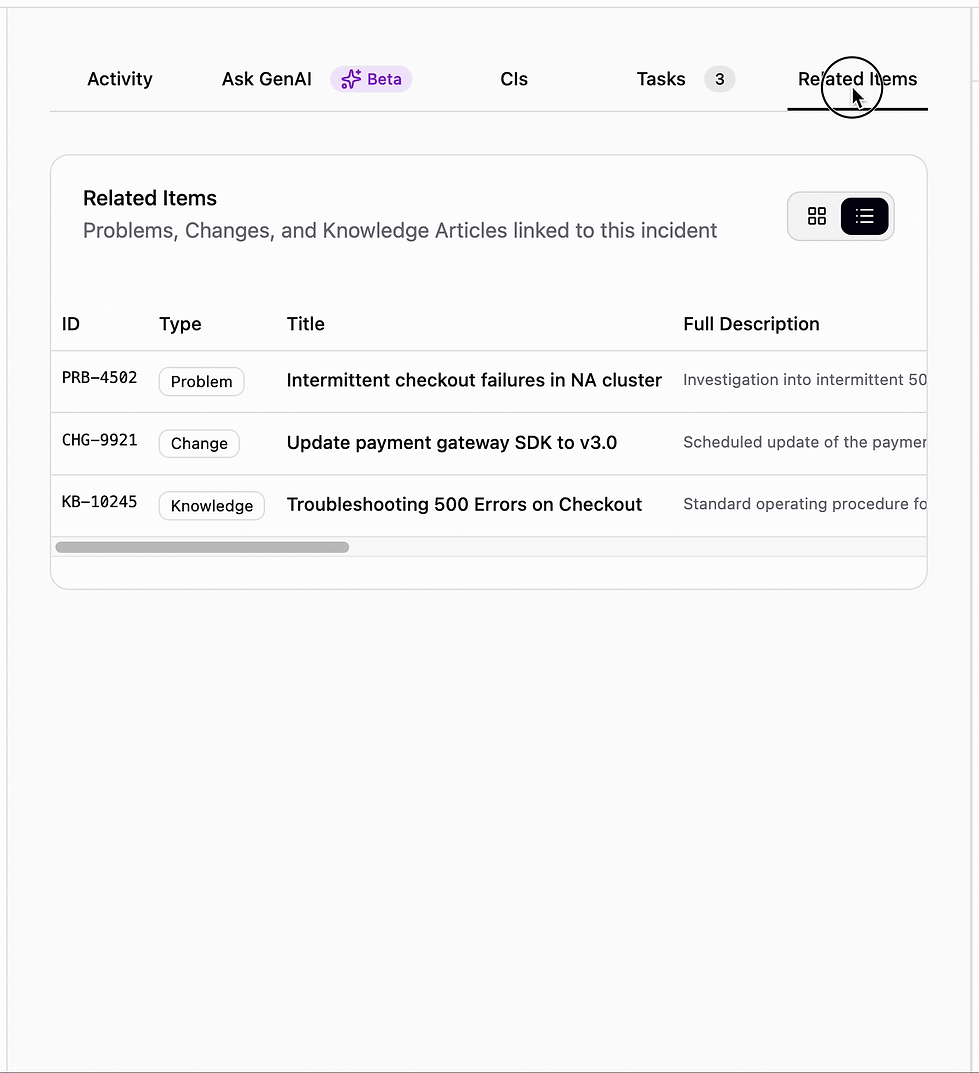
List View
Reflection
Design Iteration for AIOps Insight Panel
Iteration 2
I designed 2 options based on users feedback and ran another test with users. We concluded a mix of both options is the direction to move forward with.

OPTION A
OPTION B

FINAL

Iteration 1
Different panel width showing two levels of info granularity - Tested with a group of users


AI Insight Panel
Need: AI Insights Panel
Users lacked deeper holistic insights about the incident to understand the impact, root causes, similar incidents etc. to effectively take action.
Action
Introduced an AI insight panel providing various insights from AIOps prioritizing high risk insights for faster resolution.
Impact
The AIOps insight panel enhanced users confidence in resolving the incident faster with less unsuccessful instances.


Transition to AIOps Dashboard
Need: Access to detailed AI raw data for a thorough analysis
Users need access to raw data so they can validate system insights, investigate anomalies independently, and build confidence in the conclusions surfaced by AI or automation.
Action
Created a flow to AIOps dashboard for users to quickly deep-dive into the the data.
Challenge & Pivot
AIOps dashboard is role-based and only some users have licence so... ↓

Pivot - AIOps Dashboard Data
A nested AIOps view inside incident ticket
While working on phase 3 release, the team informed me that due to the licensing issue and the way
ITSM & AIOps connectors are designed, we can’t let some users log into AIOps dashboard.
To solve this:
✔ Provided granular AIOps insights on ITSM for IT operators
✔ Enabled users to set automation from the AIOps detailed insights.

Design variations for AIOps Dashboard inside Incident Ticket
I designed 2 options based on users feedback and ran another test with users. We concluded a mix of both options is the direction to move forward with.
OPTION A

OPTION B

Final Design
-
User gets access to conversational AI to summarize the incident and investigate.
-
If needs to review AI-enabled info, have access to AIOps insight panel for a more thorough review.
-
For a deeper dive into more details, user clicks on AIOps cards to get a context-aware raw data inside the incident ticket.
Leverage AI in high-pressure environments
Simple, digestible insights are more valuable than complex features in critical situations.
Balancing automation with human oversight
Users want the ability to validate or override AI actions during incidents
Want to see more?
01
Goal
Decreased MTTR (mean-time- to-resolve) for IT incidents and service disruptions, lowering the chances of turning into major incidents.
02
Big Idea
What if AI can act as an accelerator for incidents, provide meaningful insights and serve as a co-pilot during analysis and resolution?
03
Challenge
With a brand new technology it’s hard to understand both the true value proposition and the effort required to develop it in order to create a plan for what to build.